

The eEVOS VM Import Wizard streamlines the migration of existing virtual machines from platforms like VMware ESXi, Microsoft Hyper-V, KVM, and Xen — ensuring a fast, efficient transition into your eEVOS environment with minimal manual effort.
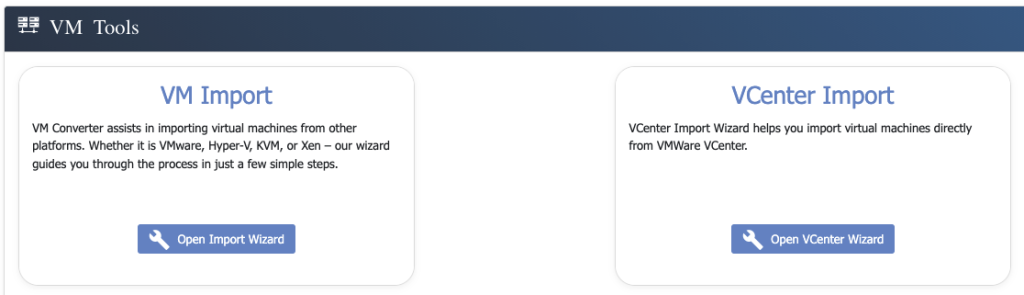
eEVOS supports two powerful import methods:
1. Import Virtual Disks (vmdk, vhd(x), qcow2, raw, img)
Easily bring in your existing VM disk images from any supported format. Simply upload the disk files, and the wizard will guide you through the process of creating a new VM around them. This option is ideal when migrating standalone VMs or when exporting from systems without centralized management.
- Supports major disk formats: VMDK, VHD, VHDX, QCOW2, RAW, IMG
- Inject necessary paravirtual drivers (for Windows VMs) to ensure full compatibility and performance
- Create a fully functional VM based on your existing virtual disks
- Compatible with exported VMs from ESXi, Hyper-V, Xen, Proxmox, and others
2. vCenter Import Wizard
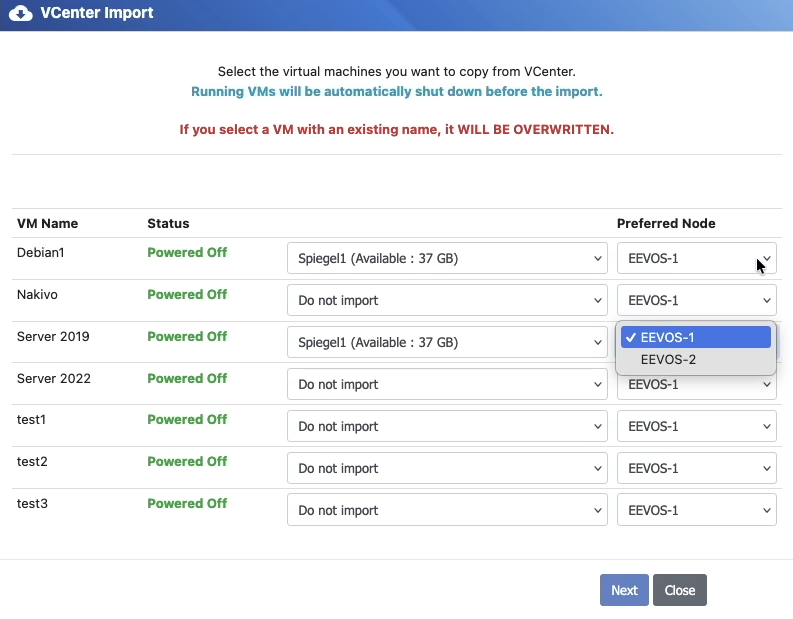
For seamless migration from VMware vCenter environments, the vCenter Import Wizard connects directly to your vCenter server, lists available VMs, and allows you to select which VMs to import.
Once selected, eEVOS will:
- Automatically download and import the VM disks
- Inject necessary paravirtual drivers (especially for Windows VMs) to ensure full compatibility and performance
- Preserve or update network MAC addresses as needed
- Allow you to assign the appropriate virtual network in eEVOS during the import process
This method enables effortless bulk migration with minimal downtime and ensures that the VMs are optimized for the eEVOS platform right from the start.
Key Benefits
- Broad Hypervisor Compatibility
Import from VMware, Hyper-V, KVM, and Xen with support for all major disk formats. - Automated Driver Injection
Windows VMs are automatically enhanced with paravirtual drivers to ensure performance and stability on eEVOS. - Integrated Networking Assignment
Easily map imported VMs to the correct eEVOS virtual networks during the import process. - Preserves Network Identity
Optionally retain MAC addresses of imported VMs for seamless integration into existing environments. - Time-Saving Workflow
Whether importing a single VM or entire infrastructure, the wizard handles the heavy lifting so you can focus on deployment and scaling.