
ZFS Pool and Fibre Channel Failover
This guide explains how to configure and perform failover for a shared ZFS pool and its Fibre Channel targets in a two-node euroNAS HA cluster. Follow the sequence carefully so that only one node owns the pool at any time.
Before you begin
- The ZFS pool must use shared disks that both cluster nodes can access.
- Both nodes, the shared storage, and Fibre Channel paths should be healthy before you change the policy.
- Record the active node, pool name, FC target, LUN, and permitted initiators.
- Verify that your application hosts use redundant FC paths where available.
Never force-import a pool while the previous owner may still access its disks. Two active owners can corrupt the pool.
Where to configure failover
- Open ZFS Management.
- Locate the shared pool and check the Active Node and Status columns.
- Select Options, then open the Failover tab.
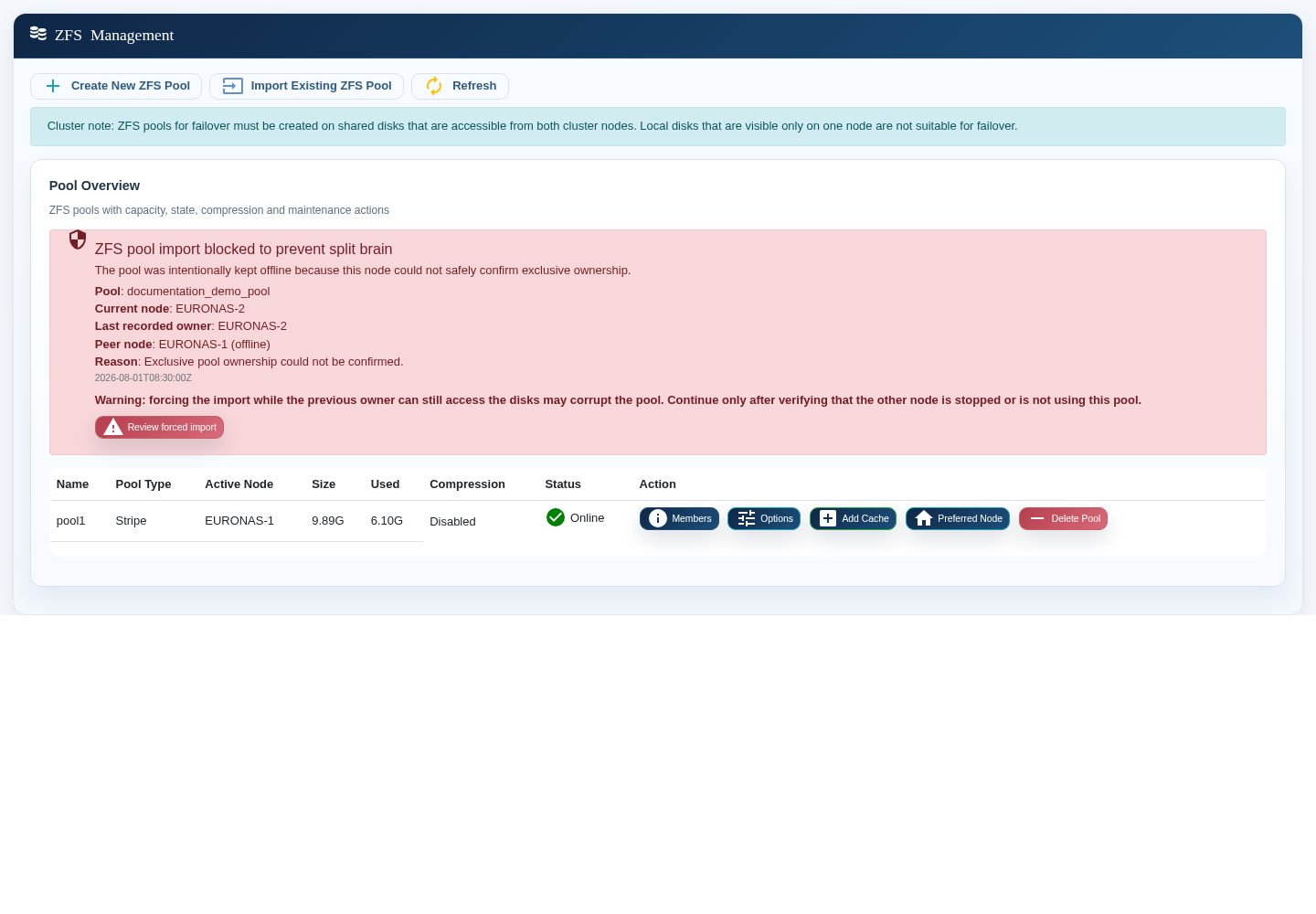
The ownership message identifies the current node, last recorded owner, peer state, and the reason why an import was blocked. Use these details before approving a takeover.
Choose the abrupt-failure policy
Under Abrupt Node Failure, select the behavior that matches your operating model:
| Policy | Behavior | Use when |
|---|---|---|
| Bring the pool online automatically | The surviving node takes over only when it can safely confirm the required ownership conditions. | Fast recovery is required and cluster communication, fencing, and shared storage are correctly configured. |
| Require manual approval | The pool remains offline until an administrator approves the takeover. | You prefer explicit control or the environment cannot always prove that the previous owner is isolated. |
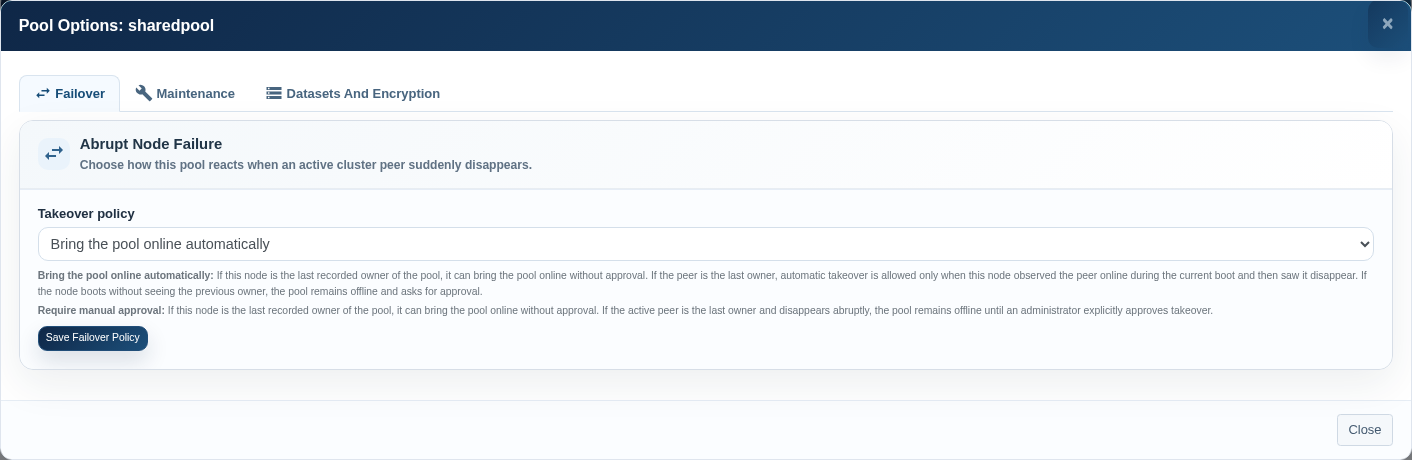
Selecting automatic takeover does not bypass split-brain protection. The pool can remain offline when exclusive ownership cannot be proven. This is expected safety behavior, not a failed policy.
Understand the ownership warning
If euronas blocks the import, read every field in the warning:
- Current node — the node on which you are viewing the pool.
- Last recorded owner — the node that last imported the pool.
- Peer node — the current cluster view of the other node.
- Reason — why exclusive ownership could not be confirmed.
Before you continue, confirm through an independent method that the previous owner is powered off, fenced, or otherwise unable to access the shared disks. If this cannot be confirmed, stop and restore cluster communication first.
Perform a safe manual takeover
- Confirm that the failed node cannot access the shared storage.
- Open ZFS Management on the surviving node and refresh the pool list.
- Review the ownership warning and select Review forced import.
- Confirm the pool name, previous owner, peer state, and your isolation check.
- Approve the import once. Do not repeat the action while the first import is still running.
- Wait until the pool status is Online and the surviving node is shown as the active node.
Verify Fibre Channel service after takeover
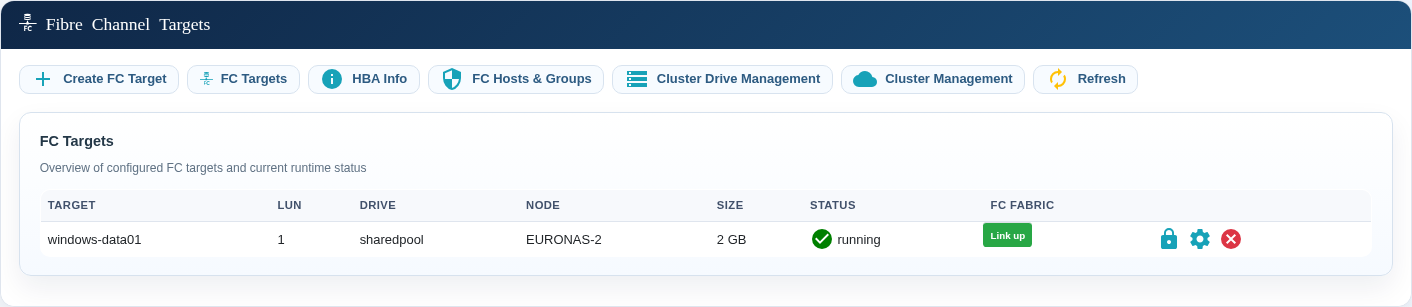
- Open Fibre Channel Targets.
- Confirm that every expected target is running.
- Check that the target uses the correct shared pool or cluster drive and LUN.
- Confirm that the FC fabric link is up.
- On the connected host, rescan the storage bus and verify all expected paths.
Restrict FC initiator access
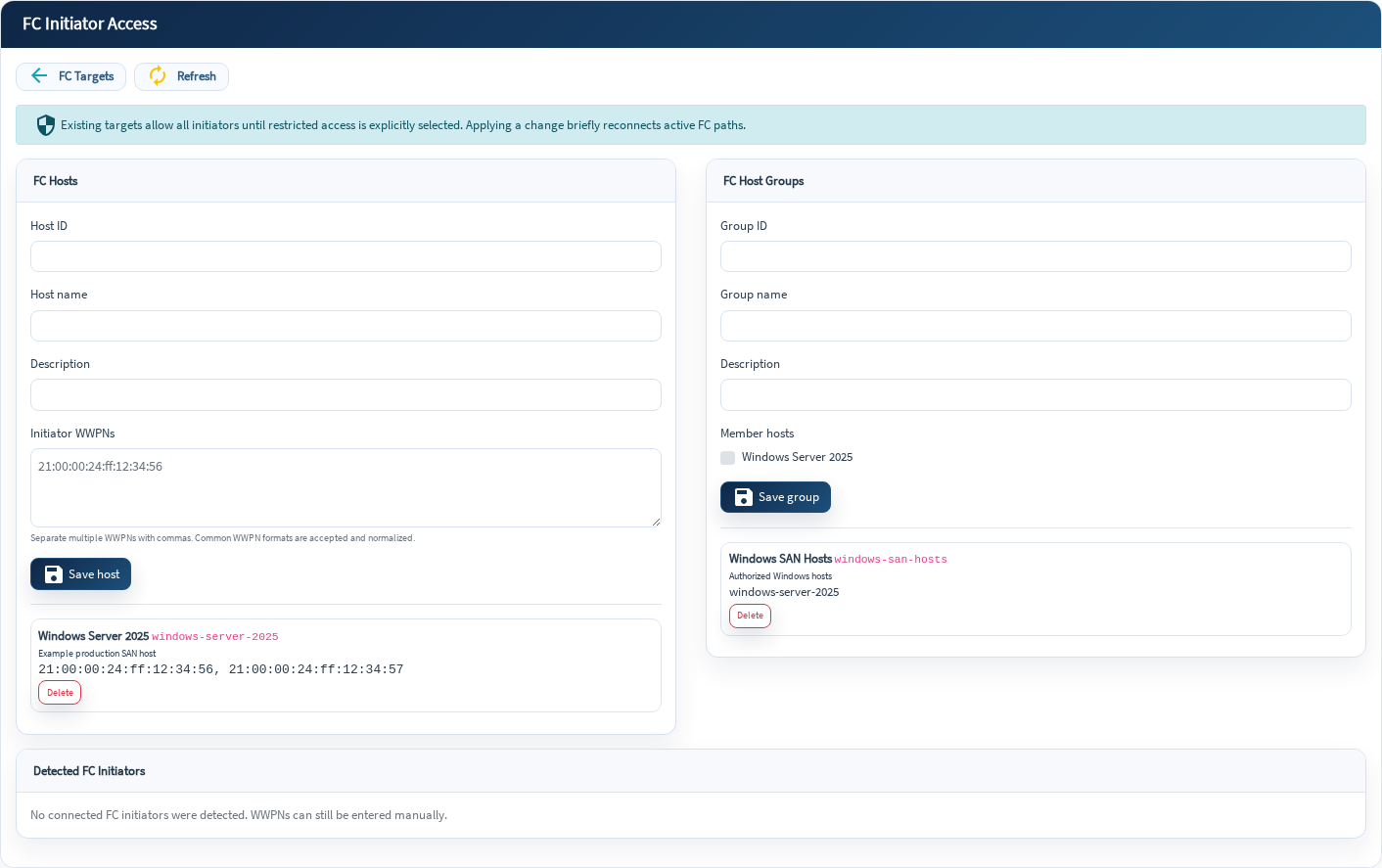
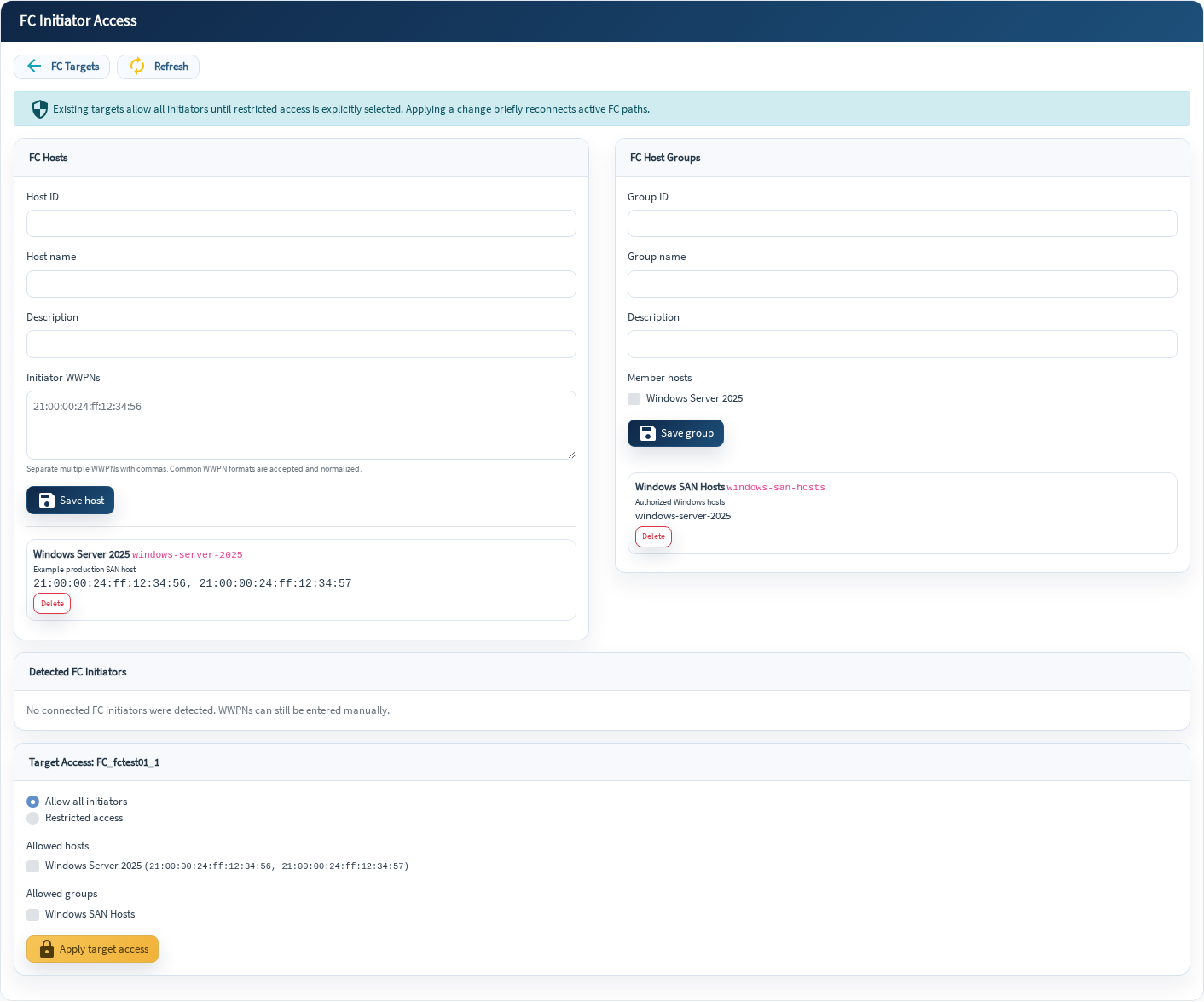
Existing targets may initially allow all initiators. Restrict access so that only the intended hosts or host groups can connect.
- Open FC Hosts & Groups.
- Create a host and enter all of its initiator WWPNs.
- Create a host group when several servers should receive the same access.
- For each target, select Restricted access and choose the permitted hosts or groups.
- Apply the change during a maintenance window because active FC paths reconnect briefly.
Enable FC target mode when required
If the cluster nodes still use their QLogic adapters as initiators, the interface displays an FC target-mode warning. Enabling target mode changes the adapter role on all cluster nodes, persists across reboots, and requires a coordinated reboot.
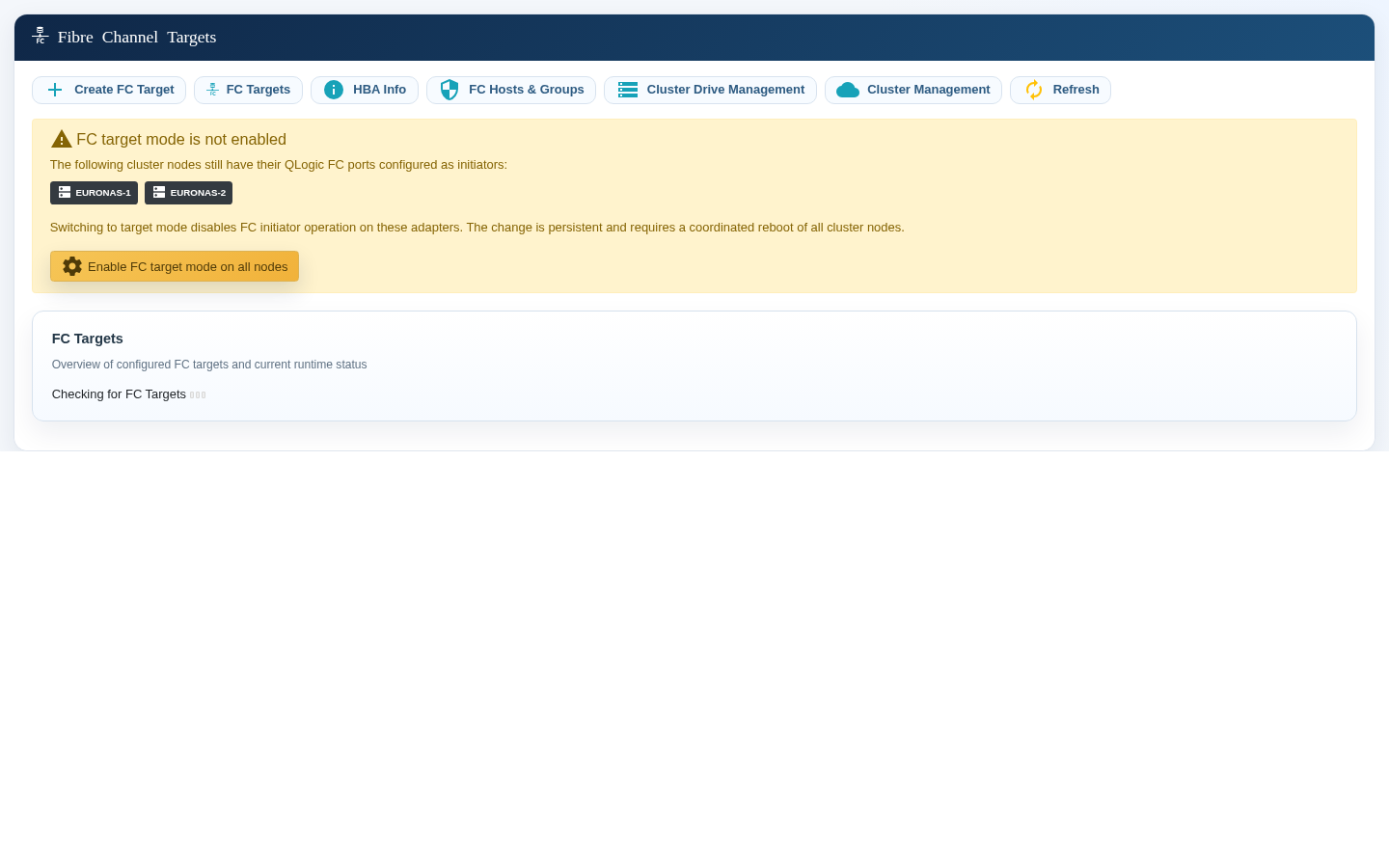
- Plan an outage for both cluster nodes.
- Confirm that the adapters are not required as initiators for other storage.
- Select Enable FC target mode on all nodes.
- Reboot the nodes in the coordinated sequence required by your cluster.
- After the reboot, verify the adapters, targets, fabric links, and host paths.
When the failed node returns
- Keep the recovered node from importing the pool during startup.
- Confirm that it rejoins the cluster as a peer and sees the surviving node as the active owner.
- Check cluster communication, shared-disk visibility, time synchronization, and FC adapter state.
- Do not move the pool back immediately unless the service design requires it.
- For a planned return, use the normal controlled failover function and repeat the verification steps.
Verification checklist
Common questions
Why did automatic takeover not start?
The surviving node could not safely prove exclusive ownership. Check whether it observed the peer during the current boot, whether the peer was fenced, and whether cluster communication was interrupted.
Can I force the import if the other node is unreachable?
Only after independently confirming that the other node is stopped or has no access to the shared disks. Network unreachability alone is not proof of isolation.
Why did Windows briefly lose its FC paths?
Targets restart on the new owner and access-control changes reconnect active paths. Multipath I/O should use the remaining paths while the fabric and host rediscover the target.
Should I fail back as soon as the repaired node returns?
No. First verify cluster health and schedule a controlled move. An immediate failback adds avoidable risk to a service that has just recovered.