
Customer Storage, Billing and Usage
The Customer Storage / Billing tab connects S3 administration with customer-oriented service workflows.
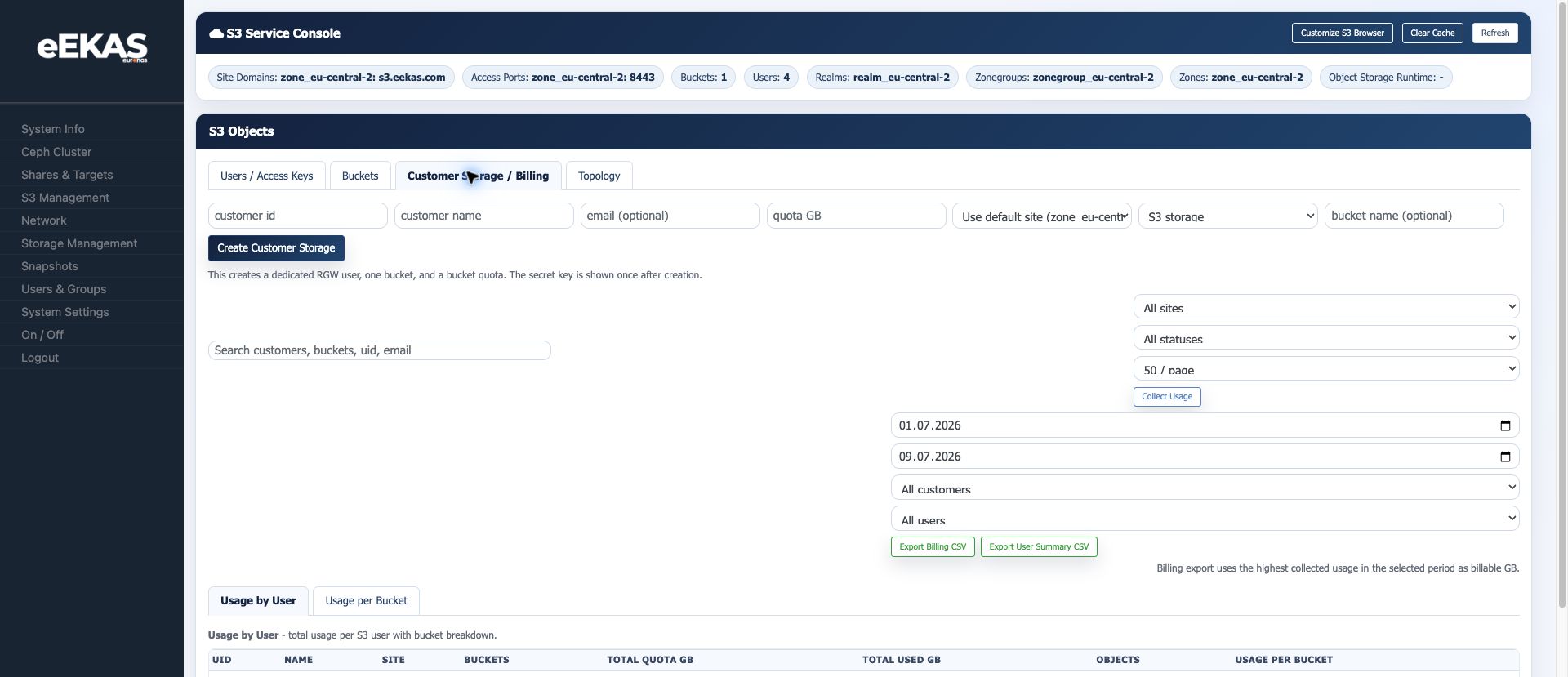
Customer Storage Provisioning
This workflow can create a dedicated customer storage record. The console states that it creates:
- A dedicated RGW user.
- One bucket.
- A bucket quota.
Available fields:
| Field | Description |
|---|---|
| Customer ID | Internal or billing-related customer identifier. |
| Customer name | Human-readable customer name. |
| Optional customer email. | |
| Quota GB | Storage quota assigned to the customer storage record. |
| Site | Site/zone context. |
| Storage type | For example S3 storage. |
| Bucket name | Optional explicit bucket name. |
The secret key is shown once after creation. Store it securely and avoid sending it through insecure channels.
Current Test Finding: Customer Storage User Login
In the live test on 2026-07-09, a customer storage record created the expected customer-style user and bucket, but the generated S3 Browser login did not work for that customer-storage-created user. A normal user created from the Users tab, named backup-service, could log in successfully with the same S3 Browser login workflow.
Until this is fixed or explained, document the following operational workaround:
- Create end-user S3 accounts from the
Userstab when browser access must be handed to a customer immediately. - Use Customer Storage / Billing for billing workflow validation, quota modeling and usage collection.
- Verify that a Customer Storage-created user can log in before sending credentials to a real customer.
- If the Customer Storage-created user fails but a normal Users-tab user works, treat the Customer Storage provisioning path as the likely bug candidate.
Usage Collection
The billing area provides filters and collection controls:
- Start date.
- End date.
- Customer filter.
- User filter.
Collect Usage.
The usage report can be viewed by user or by bucket.
Billing Exports
The interface provides:
Export Billing CSVExport User Summary CSV
The note in the console is : billing export uses the highest collected usage in the selected period as billable GB.
When to Use This Workflow
Use customer storage records when eEKAS is used as a managed storage service or internal chargeback platform. This workflow is better than manually creating unrelated users and buckets when reporting, quotas and ownership need to stay aligned.
Operational Recommendations
- Use consistent customer IDs that match CRM or billing systems.
- Define quota and bucket naming conventions before onboarding customers.
- Collect usage on a fixed schedule.
- Keep exported CSV files aligned with the billing period.
- Rotate credentials when customer responsibility changes.
- Test the created credentials in the S3 Browser before handover.
Documentation Example Names
For screenshots and examples, use names that look like a real customer workflow instead of internal test names.
Recommended neutral examples:
| Item | Example |
|---|---|
| Customer ID | backup-service |
| Customer name | Example Company Backup Storage |
storage-admin@example.com |
|
| Bucket name | company-backup-archive |
| Quota | 1 GB or another clearly documented test value |
Avoid internal names such as automation tool names, developer names or temporary debugging labels in screenshots that will be published.
Source: eEKAS live test cluster and supplied euroNAS eEKAS documents, prepared on 2026-07-09.